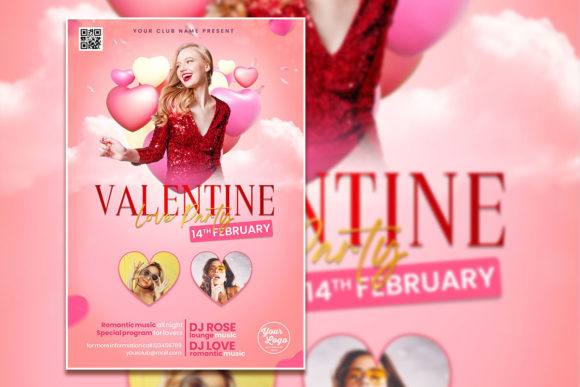
Crafting the Perfect Valentine's Invite with a Pro Template
There's a certain magic to a well-designed party invitation. It does more than just list details; it sets the mood, builds anticipation, and gives a glimpse into the experience guests can expect. When it comes to Valentine's Day, whether you're planning a romantic dinner, a lively singles' mixer, or a cozy gathering with friends, the invitation is your first chance to create that perfect, heartfelt vibe. But staring at a blank canvas can be daunting. This is where a versatile and professionally designed resource, like a fully editable Valentine's flyer template, becomes an invaluable asset for anyone looking to create something beautiful without starting from scratch.
Beyond the Basics: A Template Built for Creativity
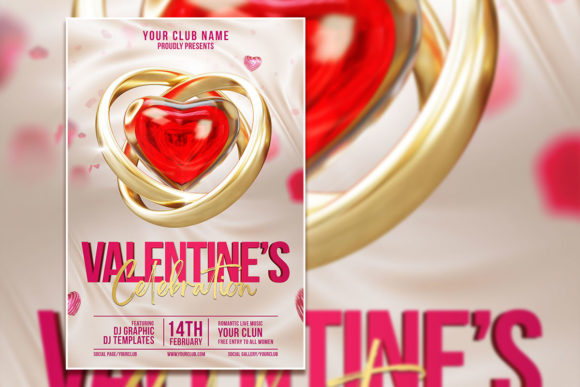
At its core, this is a Valentine's Love Party Poster Template, but thinking of it as just a poster limits its potential. Delivered as a layered Photoshop (PSD) file, it's a dynamic starting point. The key features are its high-resolution size (2000x3000 pixels at 300 dpi), ensuring crisp prints and sharp digital displays, and its fully organized layers. This isn't a flattened image you can't touch; it's a customizable project file. Every single element is editable. The text is live, meaning you can click on it with the text tool in Adobe Photoshop, delete the placeholder copy, and type in your event's name, date, and details. More importantly, you can change the font itself to better match your brand's personality or the event's theme.
The visual appeal of such a template often lies in its balanced composition. A skilled designer has already considered the hierarchy of information, the use of negative space, and the interplay of colors and textures. You get the benefit of that professional layout while retaining complete creative control. This blend of structure and flexibility is what makes it a powerful design asset.
Practical Applications for Your Brand or Business
The true value of this editable PSD template is revealed in its wide range of practical uses. It’s not just for personal parties. For small business owners, entrepreneurs, and marketers, it can serve multiple functions across various platforms and materials.
- Social Media Campaigns: Quickly generate eye-catching graphics for Instagram, Facebook, or Pinterest to promote a Valentine's Day sale, special menu, or event. The 4:6 ratio is perfect for standard feed posts.
- Print Marketing: Export the final design as a high-quality JPG for printing flyers, posters, or postcards to distribute locally or include in packaging. The 300 dpi resolution guarantees professional-looking results.
- Brand Consistency: For businesses with an established brand identity, you can easily adjust the colors within the PSD file to match your brand's palette and swap the fonts for your brand's primary typeface. This maintains visual consistency across all your Valentine's promotions.
- Digital Products & Invitations: Create a beautiful digital invitation to send via email or messaging apps. You could even adapt the design to create a branded digital wallpaper or phone background as a special gift for your audience or customers.
- In-Store & On-Site Graphics: Design window decals, table tents, or menu inserts for a café, restaurant, or retail shop to instantly infuse the space with a festive, romantic atmosphere.
By using a template like this, you're not just making a single flyer; you're establishing a visual theme for an entire campaign. This streamlines your workflow and ensures a cohesive look that strengthens brand recognition.
Making It Your Own: The Art of Customization
The instruction to "open PSD file in Adobe Photoshop and edit" is simple, but the creative possibilities are vast. The goal is to transform the generic template into something that feels uniquely yours. Here’s how to approach it thoughtfully:
First, consider your font pairing. The template likely comes with a stylish script or display font for headlines. You can keep it or replace it with a premium font from your own library. If you change the headline, make sure the body text font complements it. A common strategy is to pair a decorative script or serif font with a clean sans-serif font for readability. For example, a romantic handwritten font for "Valentine's Celebration" could be beautifully balanced with a simple, modern sans-serif for the date and address details.
Next, think about the imagery. The prompt mentions you can replace the photo with your own. This is a game-changer. Imagine swapping the generic stock photo for a stunning shot of your product, your venue, or a model representing your target customer. This single change dramatically increases the personal connection and relevance of the design. In Photoshop, this typically involves using clipping masks or smart objects to seamlessly integrate your new image into the existing layout.
Finally, don't overlook the small details. Adjusting the color of graphic elements, tweaking the opacity of a background texture, or slightly repositioning text blocks can all contribute to a more polished and intentional final product. The organized layers make this kind of fine-tuning straightforward, even for those with intermediate Photoshop skills.
A Smart Investment in Your Design Workflow
For the creative professional or busy entrepreneur, time is a precious commodity. A fully editable template like this isn't a shortcut that sacrifices quality; it's a strategic tool that enhances efficiency. It provides a professional foundation that ensures your design is structurally sound and visually appealing from the start. You can then focus your energy on the creative customization that makes the piece truly resonate with your audience.
Whether you're a blogger creating a themed post graphic, a marketer launching a seasonal promotion, or a hobbyist designing a personal invitation, this Valentine's Celebration Editable PSD Template offers a practical and high-quality solution. It empowers you to produce professional-grade visual content that can improve audience engagement, reinforce your brand identity, and effectively communicate your message with style and heart.