Design a Buzz-Worthy Birthday Party Social Media Post
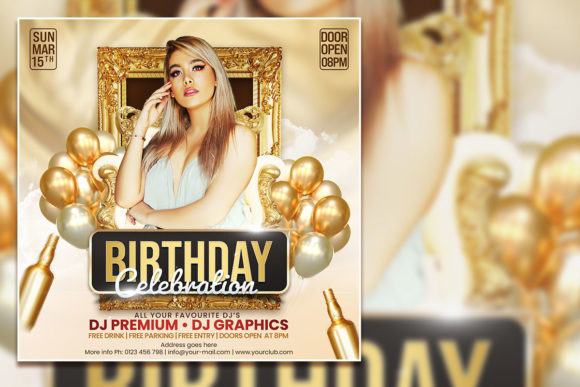
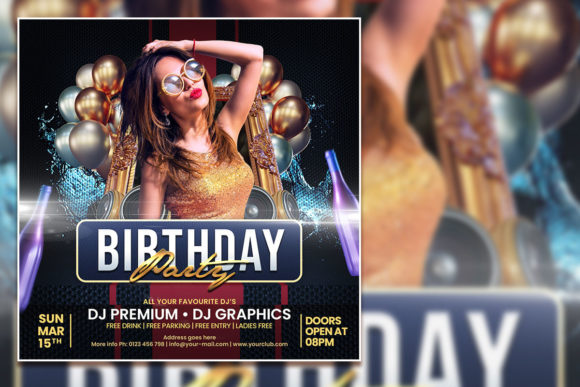
Every year, the pressure mounts to throw the perfect birthday bash, but in the digital age, the party starts long before the first guest arrives. It starts with the invite. For small business owners promoting a store event, content creators celebrating a milestone, or individuals planning a personal celebration, the visual announcement sets the tone for everything that follows. A generic "You're Invited" message gets lost in the scroll, but a professionally designed graphic creates instant excitement. This is where having the right design assets becomes a game-changer. Instead of wrestling with complicated software from scratch, using a fully editable Birthday Celebration Flyer Template allows you to produce a high-quality, visually stunning Birthday Party Social Media Post in minutes, giving you more time to focus on the event details that truly matter.
Beyond the Balloons: Why Your Flyer Template Matters
A birthday flyer is more than just a date and a time on a colorful background. It's a piece of your visual communication strategy. For a small business, it's an extension of your brand identity. For a social media manager, it's a critical piece of content that drives engagement and attendance. The challenge lies in achieving a polished, professional look without a designer's budget or skill set. This is precisely the problem a well-crafted PSD template solves. It provides a professional framework—a structured layout with balanced typography, eye-catching graphics, and a clear hierarchy of information. You're not just getting a pretty picture; you're getting a strategic design asset that ensures your message is communicated clearly and effectively. The included JPG file is perfect for quick sharing, while the editable PSD offers unlimited customization, making it a versatile tool for any creative project, from a one-time party invite to a recurring promotional series.
From Template to Trending: Customizing for Maximum Impact
The true power of an editable template lies in its flexibility. Think of it as a creative springboard. The first step is to make it yours by swapping out the placeholder text. With the organized layers in Adobe Photoshop, you can easily select any text element with the text tool and replace it with your event's specific details. This is where you inject your personality or brand voice. But customization goes far deeper than text. The instruction to replace the photo with your own is a game-changer. Imagine using a vibrant, candid shot from last year's celebration, a professional product shot if it's a business event, or a stunning portrait of the birthday person. This single change instantly elevates the design from a generic template to a personalized masterpiece. You can also adjust colors to match your brand palette, tweak the layout, or even mix and match elements from other design assets to create something truly unique. The 2000x2000 pixel size at 300 dpi is optimized for both sharp social media graphics and high-quality print materials, giving you a seamless workflow from digital invite to physical poster.
Practical Applications for Every Creator
While the primary use is a Birthday Celebration Flyer Template, the potential applications are vast. Its modern typography and clean design make it a fantastic starting point for a variety of projects. Consider these real-world scenarios:
- Social Media Graphics: The square format is perfect for Instagram posts and Facebook event covers. Use it to create a series of posts—teasers, countdowns, and final reminders—to build anticipation for your event.
- Digital Marketing Assets: Integrate the flyer design into email marketing campaigns or as a banner on your website to promote a special birthday sale or event.
- Print Invitations & Posters: The high-resolution file ensures your printed materials look crisp and professional, whether it's a small invitation card or a large-format poster for a storefront window.
- Brand Consistency: For businesses, using a consistent visual style for all events builds brand recognition. This template can be adapted for holiday parties, product launches, or customer appreciation events, creating a cohesive look across all your marketing.
- Editorial & Blog Content: Use a cropped section of the design as a featured image for a blog post about party planning tips or event recaps, adding a professional touch to your content.
This versatility makes it a valuable addition to any designer's or marketer's toolkit, serving as a go-to resource for creating engaging visual content quickly and efficiently.
Pro Tips for a Flawless Final Design
To ensure your customized flyer looks its best, a few simple best practices can make all the difference. First, when you change the font, pay attention to readability. While a decorative script font might look beautiful for a headline, ensure the body text with key details like the date, time, and location uses a clean, legible sans-serif or serif font. The template's help file includes download links for the fonts used, maintaining the design's integrity, but feel free to experiment with font pairings that reflect your event's mood—elegant, playful, or modern. Second, consider the visual hierarchy. Your most important information (the "what" and "when") should be the most prominent. Use size, weight, and color to guide the viewer's eye through the information naturally. Finally, always do a final review. Check for typos, ensure all details are correct, and get a second opinion if possible. A polished, error-free design reflects professionalism and care, making your Birthday Party Social Media Post not just an announcement, but a compelling invitation that people will be excited to accept.