Mastering Visual Storytelling with the Naomi Keynote Template
Crafting a presentation that truly resonates requires more than just bullet points and a stock photo. It demands a cohesive visual language that guides your audience, reinforces your message, and elevates your professional credibility. If you've ever struggled with disjointed slides, mismatched colors, or the sheer time it takes to build a polished deck from scratch, you know the frustration. This is where a thoughtfully designed asset like the Naomi Keynote Template shifts the dynamic, transforming a routine task into an opportunity for impactful communication.
A Foundation of Flexibility and Polish
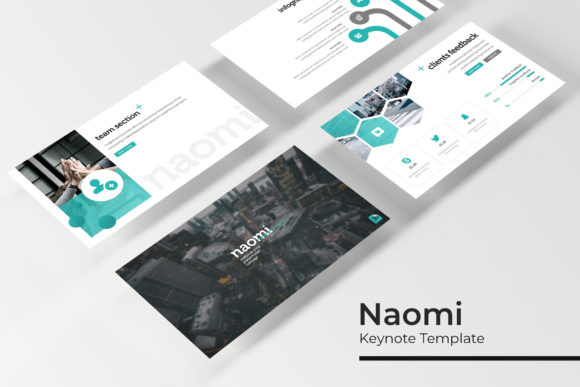
At its core, Naomi is built on the principle of structured creativity. The package includes 150+ total slides, but the real genius lies in its organization: five premade color palettes, each with 30 meticulously crafted slides. This means you're not starting with a blank canvas or a generic theme. Instead, you have five distinct visual identities ready to deploy, whether you're presenting a corporate strategy, a creative portfolio, or a marketing campaign. The color variations are more than just a hue swap; each is a fully realized design system, ensuring your typography, charts, icons, and image placeholders work in perfect harmony.
The template's value is immediately apparent in its handcrafted infographics. These aren't the clunky, default chart styles that plague many presentations. They are custom illustrations designed to make complex data—like market share, project timelines, or workflow processes—clear and engaging. Similarly, dedicated section break slides provide a natural pause in your narrative, helping to segment your talk and maintain audience focus. For creatives, the gallery and portfolio slides are particularly useful, offering elegant layouts to showcase work without the distraction of fiddly formatting.
Practical Applications for Professionals and Creatives
Consider the small business owner preparing a pitch for investors. Using a cohesive Naomi color scheme that aligns with their brand colors instantly projects a level of professionalism and attention to detail. The resizable and editable graphic placeholders allow them to drag and drop product images or team photos directly into pre-designed frames, saving hours of alignment work. For a marketing agency, the template becomes a reusable asset for client reports, ensuring every deliverable maintains a high standard of visual consistency across different brands by simply switching the master color palette.
The applications extend far beyond traditional boardroom slides. A blogger could use the portfolio layouts to create a stunning media kit. A freelance designer might build a case study presentation that serves as both a portfolio piece and a project overview. The clean, modern typography and pixel-perfect illustrations make it suitable for:
- Internal Communications: Training materials, company all-hands, and project kick-offs that need to look polished and on-brand.
- External Marketing: Webinar decks, sales pitches, and partnership proposals where first impressions are critical.
- Creative Showcases: Photography portfolios, design case studies, and artistic project presentations.
- Educational Content: Workshop materials, course modules, and conference talks that benefit from clear, structured information design.
The master slide architecture is the engine behind this efficiency. By editing elements on the master slide, you can propagate changes across the entire presentation, guaranteeing that every title, footer, and page number updates automatically. This "set it and forget it" approach is invaluable for maintaining brand identity across large decks or when multiple team members are collaborating on a single file.
Key Features That Streamline Your Workflow
Beyond the aesthetic appeal, the Naomi template is engineered for practical use. The drag-and-drop functionality for images means you spend less time wrestling with software and more time refining your message. Every graphic element is vector-based and fully editable, so you can scale icons, adjust chart segments, or modify shapes without any loss in quality. The included readme file and free font download links eliminate the guesswork, ensuring your presentation looks exactly as intended the moment you open the file.
It's important to note what's included in your download to set proper expectations. You receive five PPTX files in widescreen format, each corresponding to one of the premade color themes. The package also contains the readme guide and font information. The preview images used to showcase the template are for illustration only; your actual content will replace those placeholders, making the design your own. This distinction is crucial for understanding that you're purchasing a framework—a powerful, pre-built structure—into which you inject your unique content and imagery.
When selecting a template like this, consider the personality of your project. The modern, clean lines of Naomi's design suit contemporary brands, tech startups, and creative professionals. If your brand identity leans more traditional or rustic, you might need to adapt the color palettes significantly or consider a different style altogether. Always test the template with a sample of your actual content—your logo, your brand colors, a few key images—before committing it to a major presentation. Does the typography pair well with your logo? Do the layout grids complement your content? This quick compatibility check can save significant rework later.
Ultimately, a tool like the Naomi Keynote Template is about removing friction from the creative process. It handles the heavy lifting of design consistency, professional layout, and visual appeal, freeing you to focus on what you do best: developing compelling ideas and connecting with your audience. In a world saturated with mediocre presentations, that polished, confident visual storytelling can make all the difference.