Shuan: The Modern Presentation Template for Bold Brands
Ever stare at a blank slide deck and feel that familiar wave of creative dread? You know the content is solid, the data is sharp, and the strategy is sound, but the visual execution feels flat. That disconnect often happens when we rely on generic, overused templates that fail to capture the energy of a brand. This is where the Shuan Google Slide Template enters the conversation. It isn’t just a collection of slides; it is a comprehensive visual system designed for those who refuse to blend into the background. With a robust offering of 150+ total slides and a sophisticated design language, Shuan bridges the gap between raw data and compelling storytelling.
A Visual System Built for Flexibility
The hallmark of a great presentation asset is its ability to adapt without losing its soul. Shuan achieves this through its structure of five premade color variations. You aren't just getting a single look; you are getting a spectrum of moods. Each variation contains 30 distinct slides, ensuring that whether you are pitching a minimalist tech startup or a vibrant lifestyle brand, the palette aligns perfectly with your identity.
For the modern professional—whether a marketer, entrepreneur, or content creator—visual consistency is currency. When you switch between a desktop presentation and a shared PDF, the colors and layouts need to remain pixel-perfect. Shuan is designed on Master Slides, which means the backbone of the file is rigid enough to maintain alignment but flexible enough to allow for deep customization. This is crucial for maintaining brand recognition. If your logo is a specific hex code of teal, you can rest assured that the background elements and accent graphics in Shuan will complement rather than clash with your identity.
Infographics That Actually Clarify Data
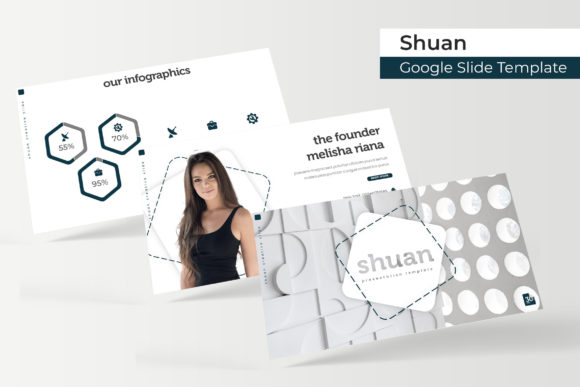
We have all sat through presentations where the "infographic" was just a screenshot of a messy Excel sheet. It kills the momentum of a pitch. Shuan takes a different approach by offering handcrafted infographics. These aren't just decorative shapes; they are functional data visualization tools built directly into PowerPoint and Google Slides.
Consider the practical applications here. If you are a small business owner presenting quarterly growth to investors, you need charts that highlight the upward trend without confusing the viewer. If you are a social media manager pitching a new strategy, you need process flows that clearly map out the customer journey. The infographic sections within Shuan are designed to make complex information digestible. They utilize clean lines and modern typography to ensure that the data does the talking, while the design does the persuading.
Furthermore, the inclusion of section break slides is a subtle but powerful feature. In long-form presentations, cognitive fatigue sets in quickly. These breaks act as visual palate cleansers, signaling to the audience that a new chapter is beginning. It keeps the pacing professional and the audience engaged.
Streamlining Workflow with Drag & Drop Efficiency
Time is the one resource we cannot manufacture. As a designer or creative professional, spending hours resizing images or cropping photos to fit a slide layout is inefficient. Shuan addresses this pain point with resizable and editable graphic picture placeholders.
The drag & drop functionality is more than a convenience; it is a workflow revolution. Imagine you are a real estate agent showcasing a new property. You have high-resolution photos ready to go. Instead of fighting with the crop tool, you simply drag the image onto the placeholder. The template does the heavy lifting, masking the image to fit the specific geometric design of the slide. This ensures that every image looks intentional and curated, regardless of the original aspect ratio of your photo.
This feature is equally valuable for bloggers and influencers creating media kits. A media kit needs to look polished to secure brand deals. By using Shuan’s placeholders, you can ensure your portfolio images are displayed with pixel-perfect illustrations and crisp resolution, projecting an image of professionalism that commands higher rates.
Beyond the Slide Deck: Real-World Applications
While the primary function of the Shuan Google Slide Template is presentation, its utility extends far beyond the conference room. The design principles embedded in the file—clean typography, balanced whitespace, and strong hierarchy—make it a valuable asset for a variety of print materials and digital products.
Think about branding collateral. The slide layouts can easily be exported as high-resolution images to serve as the basis for social media graphics or website headers. The consistency of the design ensures that your Instagram stories, LinkedIn banners, and pitch decks all speak the same visual language.
For freelancers, the template can be repurposed to create:
- Proposal Documents: Use the text-heavy layouts to outline scope and costs.
- Lookbooks: Utilize the gallery slides to create digital catalogs for merchandise or fashion lines.
- Editorial Layouts: The grid systems are perfect for laying out magazine-style content or blog summaries.
- Invitations: With a quick color swap, a corporate deck can become a sleek, modern invitation for a digital event.
The ability to export these slides as PDFs or images means you are buying a versatile design asset, not just a slideshow tool.
Technical Details and What’s Included
Understanding the technical specifications of your design assets is vital for a smooth production process. The Shuan package is built for compatibility and ease of use. It works seamlessly in both Google Slides and Microsoft PowerPoint, catering to teams that may use different ecosystems.
What’s included in the download?
- 5 PPTX Files: The core files for Microsoft PowerPoint users.
- 5 PPTX Widescreen: Optimized for the standard 16:9 aspect ratio used in modern monitors and projectors.
- 5 Premade Color Schemes: Instantly change the mood of the deck with a single click.
- Readme First: Essential instructions for setup.
- Font Links: We utilize free fonts to ensure you don't face licensing issues. Links for download are included.
A Note on Assets: It is important to clarify that the photographs and pictures used in the preview images are for illustration purposes only and are not included in the download. This is standard practice for templates, as it keeps the file size manageable and ensures you use your own high-quality, on-brand imagery.
Customization and Typography
Typography is the voice of your design. The Shuan template utilizes modern, sans-serif typefaces that prioritize readability. In a presentation setting, your audience has seconds to read a bullet point before you move on. If the font is too script-heavy or too thin, the message is lost. The chosen fonts strike a balance between aesthetic appeal and functional clarity.
However, you are not locked in. Because the file is based on Master Slides, changing the font family is a global update. If your brand uses a specific serif font or a bold display font, you can swap it out in the master view, and it will cascade through all 150+ slides instantly. This allows for deep customization while maintaining the structural integrity of the layout.
Maximizing Impact for Your Next Project
Ultimately, a template is only as good as the content you feed it, but the right template amplifies that content. The Shuan Google Slide Template is designed for the professional who values efficiency and aesthetics equally. It removes the technical barriers to good design, allowing you to focus on the message.
Whether you are a startup founder seeking funding, a teacher creating engaging lesson plans, or an agency pitching a new client, the tools provided here—ranging from portfolio slides to handcrafted infographics—equip you to communicate with authority and style. It is more than a collection of files; it is a foundation for better visual communication.