Streamline Your Pitch with the Maze Keynote Template
Imagine walking into a boardroom or launching a webinar with a presentation that doesn't just share data, but tells a visual story. For designers, entrepreneurs, and marketing professionals, the gap between a mediocre slide deck and a compelling narrative often lies in the design assets we choose. You need a tool that allows you to focus on your message rather than fiddling with alignment boxes for hours. This is where the Maze Keynote Template enters the conversation, offering a robust framework for anyone serious about visual communication.
The Anatomy of a Professional Slide Deck
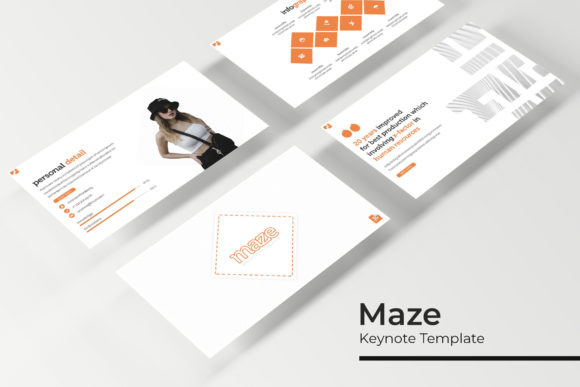
At its core, the Maze Keynote Template is built on the principle of volume and versatility without sacrificing quality. With over 150 total slides included, this collection ensures that you rarely have to build a layout from scratch again. The sheer number of options can be daunting, but the structure is actually quite intuitive. The package is divided into five premade color themes, with 30 distinct slides dedicated to each variation. This means you aren't just getting a monochrome palette; you are getting curated color theories applied to professional layouts.
One of the standout features that designers will appreciate is the pixel-perfect illustrations. We have all seen templates where the graphics look fuzzy on high-resolution screens or printouts. These assets are vector-based, meaning they remain sharp whether you are projecting on a massive conference screen or viewing on a tablet. Furthermore, the inclusion of handcrafted infographics is a massive time-saver. Data visualization is notoriously difficult to get right in standard presentation software, but these pre-designed elements allow you to present complex statistics in a digestible, aesthetically pleasing manner.
Practical Applications for Branding and Marketing
While the Maze Keynote Template is technically a presentation file, its utility extends far beyond the slide deck. For small business owners and content creators, the slides serve as a foundational toolkit for various marketing assets.
Consider your social media graphics. Instead of using a generic design tool, you can utilize the "Gallery and Portfolio slide" features to create mockups for Instagram or Pinterest. The layouts are already optimized for visual hierarchy, ensuring your imagery captures attention immediately. Similarly, for those working on editorial design or pitch decks for investors, the structure of these slides can be repurposed for print materials. You can easily export individual slides as high-resolution PDFs to create lookbooks, product catalogs, or event programs.
The template also shines in the realm of digital products. If you are an educator or a course creator, the clean, modern typography and section break slides help organize curriculum content logically. The "Readme First" file included in the package is particularly helpful here, as it outlines the specific font used in the previews. Often, a template falls flat because the user doesn't know which typeface to install. By providing a free font download link, the creators of Maze ensure that your brand identity remains consistent with the intended design style.
Streamlining Your Workflow with Editable Features
Time is a non-renewable resource for creative professionals. The Maze Keynote Template addresses this through several key technical features designed to streamline your workflow. The "Resizable and Editable Graphic" capability is crucial. You aren't locked into specific dimensions for your charts or icons; you can stretch, shrink, and color-code them to fit your specific brand guidelines without pixelation.
Perhaps the most user-friendly feature is the "Picture Placeholder" with drag & drop functionality. If you have ever struggled to get an image to fit perfectly into a circle or a complex geometric shape within presentation software, you know the frustration. This template utilizes Master Slides, which acts as the backbone of the design. By editing the master, you ensure that global changes—like updating a logo or changing a footer text—propagate across the entire 150+ slide deck instantly. This is essential for maintaining visual consistency, a key component of professional presentation that builds trust with your audience.
The inclusion of Section Break Slides is another subtle but powerful tool for engagement. Long presentations can cause "Zoom fatigue." These distinct dividers act as visual palate cleansers, signaling to your audience that you are shifting topics. This improves readability and helps retain attention, which is vital during a sales pitch or a web design proposal walkthrough.
Choosing the Right Visual Language
With five premade color schemes, the Maze Keynote Template forces you to make a strategic decision early on: which palette best represents your current project? This is where the mindset of a brand strategist comes into play.
- Corporate and Trust: If you are in finance, law, or B2B services, the cooler, more subdued color variations within the template will help convey stability and professionalism.
- Creative and Energetic: For packaging design proposals or lifestyle branding, the warmer or more vibrant color themes can inject personality into your data.
- Minimalist and Modern: If your brand identity relies on negative space and stark contrasts, the layout structure allows you to remove elements easily without breaking the design grid.
It is also worth noting the typography choices. The template likely pairs a strong sans serif font for headers with a clean serif or sans-serif for body text to ensure maximum legibility. When you download the recommended fonts, pay attention to the weight variations. Using bold weights for headers and light weights for descriptions creates a natural visual hierarchy that guides the viewer's eye from the title to the key takeaways.
For those involved in merchandise or invitations, the slide layouts can serve as inspiration for print-on-demand designs. The composition of text and imagery in a high-quality slide often translates well to the back of a t-shirt or the front of a digital invite. The key is to view these slides not just as "screens," but as modular grids of design assets.
Final Thoughts on Implementation
Ultimately, the value of the Maze Keynote Template lies in its flexibility. It bridges the gap between a static document and a dynamic visual experience. Whether you are a freelancer putting together a client proposal, a teacher organizing a semester of lectures, or a startup founder preparing for a demo day, having a library of 150+ slides at your disposal changes how you approach content creation.
Remember, the template is a starting point. The magic happens when you inject your own photography, your specific data, and your unique voice into these master slides. By leveraging the drag-and-drop placeholders and the pre-built infographics, you save hours of production time, allowing you to focus on what truly matters: delivering a message that resonates and converts.