Transform Your Next Pitch with the Cabrion Presentation Kit
Every entrepreneur, designer, and project manager knows the sinking feeling of opening a blank PowerPoint file ten minutes before a meeting starts. You have the data, you have the strategy, but you are staring at a white screen wondering how to make it look professional without spending hours dragging text boxes around. That is precisely the problem the Cabrion Power Point Template solves. It is not just a collection of slides; it is a comprehensive visual communication system designed to help you present complex ideas with clarity and style. Whether you are pitching a startup, presenting quarterly marketing results, or teaching a workshop, having a robust design foundation changes the dynamic of your presentation entirely.
The Power of Structure and Variety
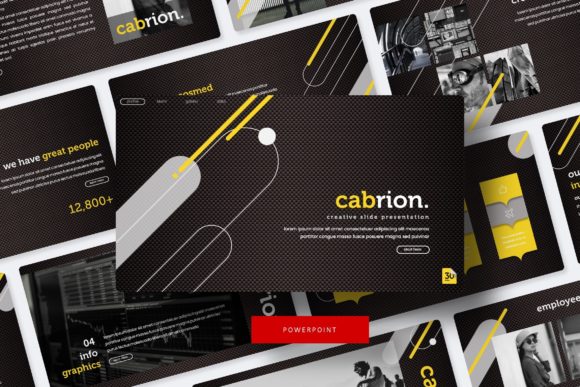
One of the standout features of this specific template package is the sheer volume of content included. With 150+ total slides, you are unlikely to run out of layouts. However, quantity means nothing without quality. Cabrion addresses this by organizing these slides across five premade color themes, offering 30 distinct layouts for each variation. This structure allows you to select a color palette that aligns with your specific brand guidelines without needing to manually recolor every element. It ensures that whether you are going for a corporate blue vibe, a creative energetic orange, or a minimalist monochrome look, the visual consistency is already built-in.
The design philosophy here centers on "pixel-perfect illustrations." In the world of design assets, this term matters. It means the vector graphics are sharp, the alignment is precise, and the visual hierarchy has been carefully considered by the designer. You will find handcrafted infographics that turn boring statistics into engaging stories, as well as dedicated section break slides that give your audience a mental pause between topics. These are not just generic placeholders; they are tools for visual storytelling.
Practical Applications for Modern Professionals
While the primary function is a presentation, the utility of a high-quality template like Cabrion extends far beyond the conference room. For small business owners and marketing professionals, this kit serves as a foundation for brand identity systems. You can use the slides to create standardized pitch decks that reinforce your brand recognition every time you send a proposal. Consistency in your visual communication builds trust, and using a cohesive set of assets ensures that your brand looks polished across all touchpoints.
Consider the workflow improvements offered by the technical specifications. The graphics are fully resizable and editable, which is crucial when you need to adapt a slide for different aspect ratios or specific content needs. The "drag & drop" picture placeholder functionality is a massive time-saver. Instead of cropping and resizing images manually, you simply drag your high-resolution photography into the designated area, and the template handles the rest. This feature alone is invaluable for content creators who need to update decks frequently with fresh case studies or portfolio pieces.
Furthermore, the inclusion of gallery and portfolio slides makes this an excellent choice for creative professionals. If you are a photographer, architect, or graphic designer, you can use these specific layouts to showcase your work in a grid or spotlight format. It transforms the presentation from a mere data dump into a visual portfolio, helping you engage your audience emotionally rather than just intellectually.
Typography and Readability Considerations
A presentation is only as good as its readability. A common pitfall in PowerPoint design is using fonts that look great on a high-res monitor but become illegible on a projector screen. The Cabrion template addresses this by utilizing specific font pairings included in the download package. The "Readme First" file included in the kit is essential reading here; it directs you to the free font download links used in the preview. By sticking to these recommended typefaces, you ensure that the text hierarchy—headings, subheadings, and body copy—is maintained exactly as the designer intended.
Typography plays a silent but massive role in how your message is received. Using a clean sans-serif for body text ensures readability from the back of the room, while a more distinct display font for headers grabs attention. The Cabrion kit likely leverages modern typography principles to balance aesthetics with function. When you pair these slide layouts with the correct fonts, you elevate the professionalism of your entire presentation. It signals to your audience that you care about the details, which often translates to credibility in business.
Mastering Your Design Workflow
To get the most out of the Cabrion Power Point Template, it helps to think like a designer, even if you aren't one. Start by reviewing the Master Slides. This is where the global design settings live. By understanding how the master slides are constructed, you can make broad changes to the entire deck quickly, such as updating a logo placement or changing a global color accent. This is the difference between a novice user who edits every slide individually and a power user who leverages the template's built-in automation.
When assembling your content, pay attention to the visual balance. The handcrafted infographics provided are designed to hold a specific amount of data. If you try to cram too much text into a chart meant for high-level metrics, the design will break down. Trust the negative space provided in the layouts; it is there to help the audience process information. For social media managers, these slides can even be exported as high-quality images to create "carousel" posts for LinkedIn or Instagram, repurposing your presentation content into valuable digital marketing assets.
Finally, always review the licensing. The note regarding photographs and pictures used in the preview is standard for premium fonts and templates. It means you are purchasing the design framework and the vector elements, but the stock photos used for demonstration are copyrighted to their respective owners. You will need to supply your own high-quality imagery. This is actually a benefit, as it forces you to use authentic photos of your team, products, or services, which resonates much better with audiences than generic stock imagery.
By integrating the Cabrion Power Point Template into your workflow, you are effectively buying back time. You remove the friction of design decision-making and replace it with a streamlined, professional system. Whether you are closing a sale, securing a grant, or educating a client, having a visually stunning and structurally sound presentation makes the journey significantly smoother. It is an investment in your professional image that pays dividends every time you click "present."