Transform Your Slides with the Segiri Power Point Template
Let’s be honest—creating a polished, professional presentation from scratch is a time sink. You spend hours aligning text boxes, fiddling with color palettes, and hunting for icons that actually look cohesive. If you’ve ever stared at a blank PowerPoint slide wondering how to make your message visually compelling without hiring a designer, you know the struggle. That’s where a well-structured template system changes everything.
A Visual System Built for Real-World Presentations
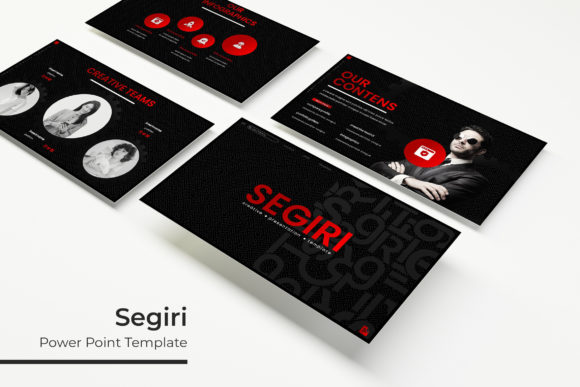
The Segiri Power Point Template isn’t just another set of pretty slides. It’s a carefully designed framework that gives you over 150 slides organized across five distinct color schemes. Each color variation includes 30 purpose-built slides, meaning you’re not recycling the same layout repeatedly. You get variety without visual chaos.
What makes this approach practical is the consistency it enforces. Every slide within a color scheme shares the same design language—typography, spacing, icon style, and color accents all work together. When you move from an agenda slide to a data visualization to a team introduction, the visual flow feels intentional. Your audience doesn’t get whiplash from mismatched design choices.
Infographics That Actually Communicate
We’ve all seen presentation templates that include infographics as an afterthought—cluttered, hard to edit, and visually inconsistent with the rest of the deck. The handcrafted infographics in this template collection take a different approach. They’re designed to simplify complex information, whether you’re explaining a process, comparing data points, or illustrating a timeline.
The key here is editability. Each infographic element is fully resizable and built on master slides, so you can adjust proportions without breaking the design. Need to extend a bar chart? Add a step to a process flow? Swap out an icon? The structure accommodates those changes gracefully. This matters when you’re working under deadline pressure and need to iterate quickly.
For small business owners presenting to investors, marketers pitching campaign results, or educators breaking down concepts for students, these infographics bridge the gap between raw data and audience understanding. You’re not just showing numbers—you’re telling a visual story that people can follow and remember.
From Brand Pitches to Portfolio Showcases
One of the most underused features in presentation templates is the gallery and portfolio slide. Many templates treat these as generic image grids, but Segiri’s approach gives you layouts that frame your work thoughtfully. Whether you’re a freelance designer showing client projects, a photographer curating a series, or a product company displaying merchandise, these slides let your visuals breathe.
The picture placeholder system uses a drag-and-drop mechanism that respects your workflow. Instead of wrestling with cropping tools and alignment guides, you drop your image into a pre-sized container and it fits. The pixel-perfect illustrations surrounding your images—arrows, decorative elements, section dividers—maintain their crispness at any resolution because they’re vector-based.
This is particularly useful for branding presentations. When you’re unveiling a new logo, color palette, or visual identity to a client, the slides themselves need to feel like an extension of that brand. The five premade color schemes give you starting points that range from corporate-friendly neutrals to vibrant creative palettes, so you can match the template to your project’s personality rather than forcing your brand into someone else’s aesthetic.
Practical Details That Save You Time
The package includes five PPTX files in widescreen format, each corresponding to a color variation. This structure means you can open the file that best fits your project and start immediately, rather than spending the first thirty minutes reconfiguring colors and layouts.
Typography is handled thoughtfully. The template uses free fonts, and the included documentation provides direct download links. This eliminates the frustrating scenario where you open a purchased template only to discover it relies on a font that costs an additional licensing fee. You install the fonts, open the file, and everything renders as intended.
Section break slides deserve special mention. These transitional pages create natural breathing points in your presentation, helping your audience mentally reset between topics. They’re designed with enough visual interest to hold attention during pauses but restrained enough that they don’t compete with your content. For longer presentations—quarterly business reviews, workshop decks, educational lectures—these breaks improve information retention significantly.
Making It Work for Your Specific Needs
The real value of a template system like this emerges when you start adapting it to different contexts. A marketing team might use the same template for internal strategy decks and client-facing campaign proposals, simply switching color schemes to match each audience. An entrepreneur could use it for investor pitches one week and product launch webinars the next.
The master slide architecture is the engine behind this flexibility. When you modify elements on the master slide—adjusting font sizes, changing accent colors, repositioning logo placeholders—those changes cascade throughout the entire presentation. This ensures visual consistency even when multiple team members are editing different sections. It’s the kind of structural integrity that separates a professional deck from a hastily assembled collection of slides.
For content creators and bloggers who repurpose their material across platforms, the widescreen format translates well to video presentations and webinar recordings. The clean layouts and readable typography hold up on screen recordings, and the consistent visual framework reinforces your personal brand every time you present.
Getting Started Without Overthinking It
Here’s a practical suggestion: don’t try to use all 150 slides at once. Open the color variation that resonates most with your current project. Identify the three or four slide types you’ll actually need—maybe an opening title, a data slide, a team layout, and a closing call-to-action. Build your content around those first. Once you see how the template handles your specific material, you’ll naturally discover which additional slides serve your narrative.
Pay attention to the spacing and hierarchy the template establishes. The designers made deliberate choices about where your eye lands first, how text relates to visuals, and where white space creates emphasis. Before you start rearranging elements, work within the existing structure for at least one full presentation. You might find that the layout choices you would have made instinctively aren’t actually the most effective ones.
The photographs and preview images shown in the product listing aren’t included in the download, but the placeholder system makes inserting your own visuals straightforward. If you don’t have professional photography ready, simple solid-color fills or abstract backgrounds work well as temporary placeholders while you finalize your content. The design framework is strong enough to look polished even with placeholder imagery.
Whether you’re preparing a quarterly business review, designing a workshop curriculum, pitching a new brand concept, or creating a webinar series, having a reliable visual foundation removes one major variable from your preparation process. You can focus your creative energy on your message and your delivery, knowing the visual framework will hold its own.