Kecho Keynote Template: Unlocking 150+ Slides for Your Brand
Let’s be honest: most of us have sat through a presentation that felt like a chore. The slides were cluttered, the colors clashed, and the information was lost in a sea of generic clip art. For designers, entrepreneurs, and content creators, a presentation isn't just a collection of facts; it's a storytelling opportunity. It’s a chance to pitch a client, launch a product, or define a brand identity. When the visuals fail, the message falls flat. That is exactly why a robust visual asset like the Kecho Keynote Template is more than just a download—it is a foundational tool for professional communication.
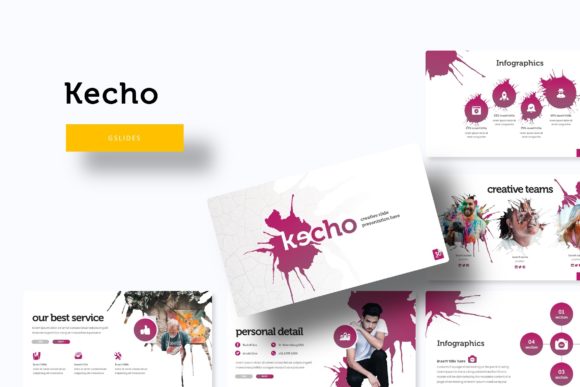
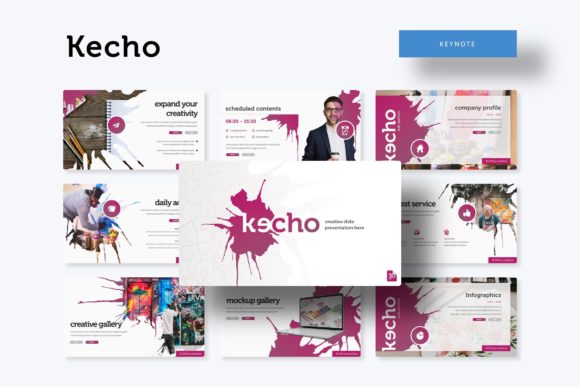
The core appeal of this template lies in its sheer volume and versatility. With over 150 total slides included, you aren't just buying a single look; you are investing in a comprehensive design system. The package includes five premade color variations, each containing 30 distinct slides. This structure allows you to maintain a consistent visual language across different departments or campaigns without looking repetitive. Whether you are drafting a corporate quarterly report or a creative mood board for a client, having that variety at your fingertips saves hours of design time.
Visual Consistency and Brand Recognition
One of the biggest struggles for small business owners and freelancers is maintaining consistency. You might have a great logo, but if your pitch deck uses a different color palette than your website, you create cognitive dissonance for your audience. The Kecho Keynote Template solves this by offering pixel-perfect illustrations and a structured framework that enforces consistency. Because the graphics are handcrafted and editable, you can tweak the vector shapes to match your exact brand guidelines. This ensures that every time you share a screen, you are reinforcing your brand identity rather than diluting it.
Furthermore, the inclusion of section break slides is a subtle but powerful feature for audience engagement. Good pacing is essential in visual communication. When you abruptly switch from financial data to marketing strategy without a visual pause, your audience gets whiplash. These section breaks act as mental reset buttons, allowing viewers to digest information before moving on to the next chapter of your story. It’s a design choice that directly impacts how your message is received and retained.
Beyond the Slides: Practical Applications for Modern Creatives
While the primary function is a presentation, a high-quality Keynote template often serves as a catalyst for other design assets. Think of the slides not just as slides, but as modular layouts. A graphic designer could easily export a slide layout to use as a quick one-page flyer or a social media graphic. The "Gallery and Portfolio slide" features, for instance, are perfect for web design mockups or editorial layouts.
Consider the entrepreneur who is building a brand identity. They can use the template to create a comprehensive brand style guide. By utilizing the different color variations included in the package, they can present three distinct "moods" or "vibes" for their brand to stakeholders. This turns a static presentation into an interactive decision-making tool. The flexibility to resize and edit graphics means you aren't stuck with rigid layouts; you can adapt the modern typography and imagery to fit packaging design concepts or merchandise mockups right there on the slide.
Mastering the Workflow: Drag-and-Drop Efficiency
Time is the most valuable currency for a creative professional. The technical architecture of the Kecho Keynote Template is designed to respect that time. Built on Master Slides, the template ensures that global changes—like updating a footer or changing a font style—happen instantly across the entire deck. This is a massive improvement over manually editing 30 individual slides when a client decides they want a slightly darker shade of blue.
The "Picture Placeholder" feature is another game-changer for efficiency. We’ve all struggled with cropping images to fit awkward boxes. With a drag-and-drop system, you simply grab an image from your desktop and drop it into the designated area. The template handles the cropping and sizing automatically. This is particularly useful for content creators and marketers who need to swap out images frequently to keep their decks fresh for different audiences. It turns a tedious formatting task into a seamless creative flow.
Typography and Readability: The Unsung Heroes
A beautiful layout means nothing if the text is illegible. The visual hierarchy of the Kecho Keynote Template is built to guide the eye naturally. By utilizing premium font options (with free download links included in the package), the template ensures that your headings pop while your body text remains readable. This is crucial for readability considerations, especially when presenting in large conference rooms or via screen share on Zoom calls.
For those looking to refine their font pairing, the template serves as an excellent case study. It demonstrates how to balance different weights and styles to create a rhythm on the page. Whether you prefer the clean lines of a sans serif font for your data or a script font for accent text, the provided styles offer a solid starting point. You can easily test how different typeface choices alter the personality of the deck—making it feel more corporate, more playful, or more urgent—depending on your project goals.
What’s Included and How to Get Started
When you download the package, you aren't just getting a single file. The kit is comprehensive, designed to give you maximum utility out of the box. You receive five PPTX files tailored for widescreen displays, ensuring your content looks sharp on modern monitors and projectors. The inclusion of a "Readme First" file is a thoughtful touch, guiding you through the setup process so you can start designing immediately rather than troubleshooting technical issues.
It is important to note the licensing and usage terms, specifically regarding the imagery. While the illustrations and graphics are part of the package, the photographs used in the previews are for illustration purposes only. This is standard practice in the design assets world, but it’s a crucial detail to remember. You will need to source your own high-quality stock photos or personal photography to populate the picture placeholder areas. This actually works in your favor, as it ensures your final presentation is 100% unique to your brand, rather than using stock images that your competitors might also use.
For the creative entrepreneur, the small business owner, or the hobbyist looking to professionalize their output, this template bridges the gap between amateur and expert. It provides the structural integrity of a professional design agency with the flexibility required for dynamic, fast-paced work. By leveraging the handcrafted infographics and modular slide structures, you can transform complex data into compelling visual stories. Ultimately, the goal of any presentation design is to persuade and inform, and the Kecho template provides the robust canvas needed to do exactly that.