Streamline Your Visuals: The Power of the Imme Keynote Template
Every professional has sat through a presentation where the slides were so cluttered, poorly designed, or visually disjointed that the actual message got lost in the noise. Whether you are a marketing director pitching a new campaign, an entrepreneur seeking funding, or a designer presenting a portfolio, the medium is just as important as the message. A cohesive visual narrative builds trust before you even speak a word. This is where having a robust design asset like the Imme Keynote Template becomes not just a convenience, but a strategic necessity. It removes the friction of design decision-making, allowing you to focus entirely on your content and delivery.
A Deep Dive into Visual Consistency and Structure
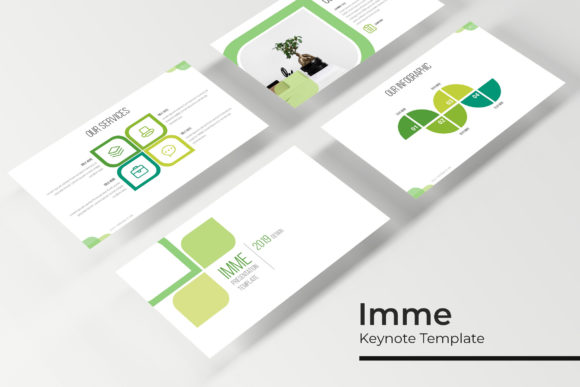
The primary challenge in creating a compelling deck is maintaining visual consistency across dozens—sometimes hundreds—of pages. The Imme Keynote Template solves this by offering a staggering 150+ total slides. This volume is crucial because it prevents the "Frankenstein" effect, where a presenter stitches together slides from five different sources, resulting in mismatched fonts, varying alignment, and jarring color shifts. With this package, you are working within a unified ecosystem. The template is built upon a Master Slides architecture. This is a technical feature with massive practical benefits; it means that global changes to fonts, colors, or logos can be applied instantly across the entire presentation, ensuring that your brand identity remains rigidly consistent from the opening title to the final "Thank You" slide.
Furthermore, the inclusion of 30 slides for each of the 5 premade color variations is a thoughtful touch for brand strategists. Color psychology plays a vital role in how information is received. You might find that the deep blue variation works best for a corporate finance report, while a vibrant coral or teal variation is perfect for a lifestyle brand launch. Having these options ready-made allows you to test different moods and visual tones without manually recoloring every single element, which is a common time-sink in standard PowerPoint or Keynote workflows.
Practical Applications: Beyond the Boardroom
While the name suggests a keynote scenario, the utility of a premium presentation template extends far beyond the conference stage. Think of these files as a modular design system. For the small business owner, the Gallery and Portfolio slides are invaluable. Instead of sending a generic email attachment, you can present your work—be it photography, interior design, or product manufacturing—in a curated, editorial format. This elevates the perceived value of your work immediately.
Content creators and bloggers can repurpose these layouts for digital products. Imagine taking the handcrafted infographics included in the Imme package and exporting them as standalone graphics for a blog post or a Pinterest pin. The pixel-perfect illustrations ensure that these assets look crisp on high-resolution screens, which is essential for web design and social media graphics. Similarly, educators and coaches can utilize the structure to create compelling workshop materials or online course slides that feel professional and engaging, rather than hastily thrown together.
The Technical Edge: Editable Graphics and Workflow Efficiency
One of the standout features of the Imme Keynote Template is its commitment to user-friendliness through Resizable and Editable Graphics. We have all used templates where an icon is locked, or a chart is a flat image that cannot be updated. This creates a bottleneck in the design process. Here, the graphics are vector-based, meaning you can scale them up or down without losing quality—a critical feature for print materials or poster designs where resolution matters.
The inclusion of Picture Placeholder drag & drop functionality streamlines the workflow significantly. For a photographer or a real estate agent updating a monthly portfolio, being able to simply drag a new image into a pre-shaped mask saves hours of formatting time. It ensures that images are cropped consistently, maintaining the clean grid layout that characterizes modern typography and layout design. This "plug-and-play" aspect makes it accessible for hobbyists or business owners who may not have advanced technical skills in presentation software but still need a high-end result.
Maximizing the Included Assets
A great template is more than just empty boxes for text; it is a toolkit. The Imme package includes Section Break Slides, which are essential for pacing. In a long presentation, these visual pauses help the audience digest information and signal a shift in topic, much like chapters in a book. Without them, a 50-slide deck can feel like an endless wall of text.
When you download the package, you receive 5 PPTX Files (standard) and 5 PPTX Widescreen files. This distinction is vital for modern presentations. While standard 4:3 ratios are still used in some legacy systems, widescreen 16:9 is the current standard for monitors, projectors, and webinars. By providing both, the template ensures you are prepared for any venue or platform. Additionally, the "Readme First" file and free font download links are a hallmark of a professional design asset. There is nothing more frustrating than opening a file to see "Font Missing" errors. By guiding you to the exact typeface used by the designers, the template ensures that the visual consistency intended by the creator is preserved perfectly in your final output.
Strategic Branding and Final Polish
For the creative entrepreneur, the way you present your brand identity matters as much as the product itself. Using a disjointed collection of clip art and mismatched fonts can inadvertently signal a lack of attention to detail. By utilizing the Imme Keynote Template, you are leveraging a pre-vetted design system that balances white space, typography, and imagery. The Section Break Slides and Pixel-perfect illustrations work together to create a rhythm that guides the viewer's eye.
Consider using these slides for Editorial layouts or internal Marketing assets. The clean lines and structured grids make it easy to adapt the slides for one-page summaries or digital lookbooks. Whether you are creating a pitch deck for investors, a mood board for a client, or a visual guide for your team, the flexibility of the Master Slides ensures that the final output looks bespoke. It transforms a standard presentation software into a versatile design tool, bridging the gap between a simple slideshow and a professional brand identity document.